Snapchat Ghost Mode and turning your location off
The short answer
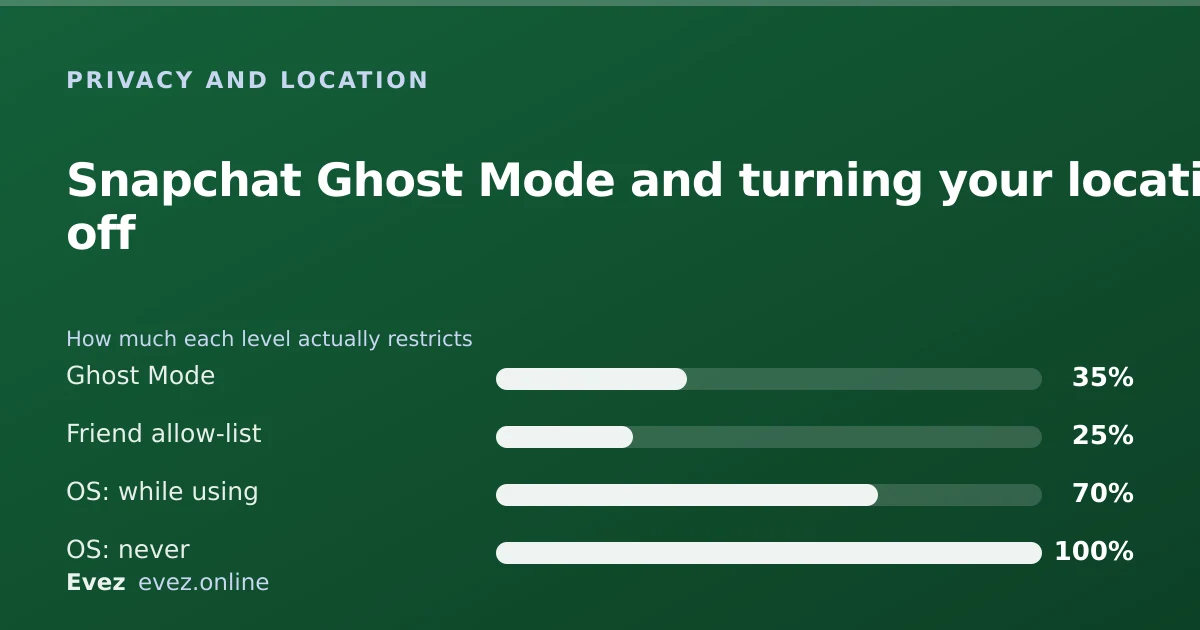
There are three separate location switches. Ghost Mode hides you from friends, the per-friend list controls who sees you, and only the phone's own permission stops Snapchat receiving location at all.
Key takeaways
- Ghost Mode is a visibility setting, not a data setting. Snapchat can still receive location while it is on.
- The iOS or Android location permission is the only switch that genuinely stops collection.
- Setting the permission to "While Using the App" is the sensible middle ground for most people.
- Turning location off entirely breaks Map features and some lenses, but nothing in core messaging.
On this page
Three switches, three different effects
Turn off my location means something different depending on who you are hiding from, and Snapchat hands you three separate controls to do it. They live in different places, they never refer to each other, and only the third does what most people assume all of them do.
| Control | Where it lives | Hides you from friends | Stops Snapchat receiving location |
|---|---|---|---|
| Ghost Mode | Snapchat → Map → settings cog | Yes | No |
| Per-friend sharing list | Snapchat → Map → settings cog | From the people you exclude | No |
| OS location permission | iOS or Android system settings | Yes | Yes |
Level 1 — Ghost Mode
Ghost Mode removes you from the Map for everyone at once, with an optional timer. It is the right tool when you want to stay off the Map socially but still use location-dependent features like local lenses.
Enabling Ghost Mode
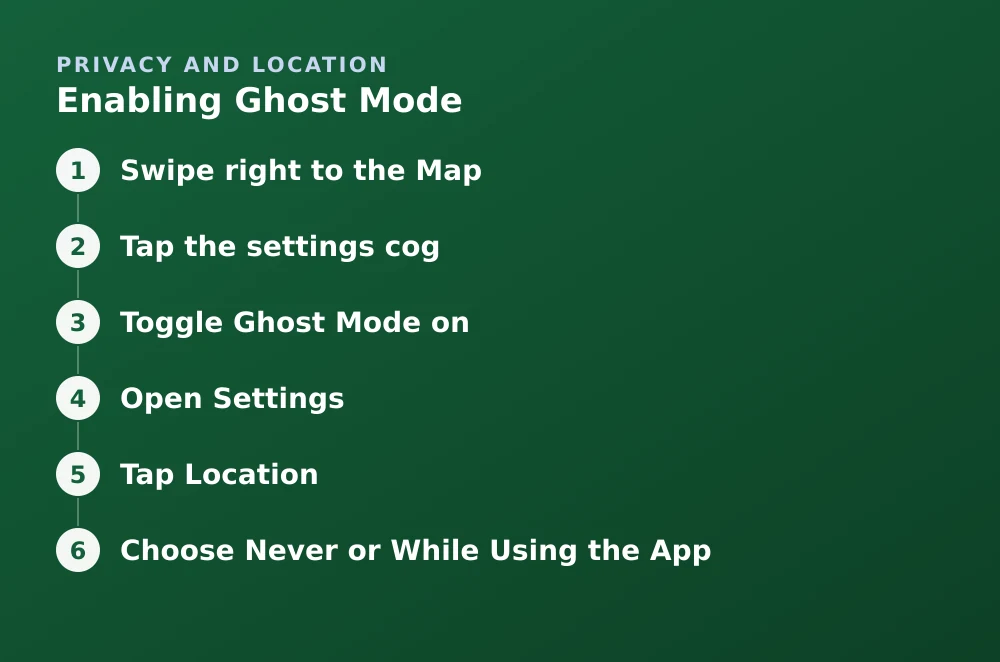
- Swipe right to the MapOr tap the pin icon in the top-left of the Camera screen.
- Tap the settings cogTop-right corner of the Map.
- Toggle Ghost Mode onThen choose 3 Hours, 24 Hours, or Until Turned Off.
The timer options make Ghost Mode Snapchat's nearest equivalent to a pause. If that is what you are after, the mechanics are covered in more detail in pausing your location on Snapchat.
Level 2 — share with fewer people
Ghost Mode is all-or-nothing. If the problem is one person, an exclusion list is less disruptive and less conspicuous. Nobody is notified when you remove them.
- My Friends — everyone you have added both ways can see you.
- My Friends, Except… — everyone except a named list. Good when one specific person is the reason.
- Only These Friends… — an allow-list. Good if you want the Map to work for two or three close friends and nobody else.
Level 3 — revoke the permission
This is the only option that changes what Snapchat receives rather than what your friends see. It is set in your phone's settings, not inside Snapchat.
iPhone
- Open SettingsScroll down to the app list and tap Snapchat.
- Tap LocationYou will see Never, Ask Next Time, While Using the App, and possibly Always.
- Choose Never or While Using the AppNever stops collection entirely. While Using the App limits it to the foreground, which is the sensible default for most people.
- Turn off Precise LocationOptional, but it downgrades what Snapchat gets from an exact position to an approximate area.
Android
- Open Settings → AppsFind and tap Snapchat.
- Tap Permissions → LocationChoose Don't allow or Allow only while using the app.
- Turn off precise locationToggle Use precise location off to hand over an approximate area instead of a specific point.
What breaks when location is fully off
Turning the permission to Never is safe for messaging but does cost you some features. Nothing in the core send-and-receive experience depends on it.
| Feature | Still works? |
|---|---|
| Sending and receiving snaps and chats | Yes |
| Stories, Memories, Spotlight viewing | Yes |
| Seeing friends on Snap Map | No |
| Location-based lenses and geofilters | No |
| Submitting a snap to Our Story | No |
| Local place search on the Map | Degraded |
The setting people forget
Location is not the only thing that reveals where you are. A geofilter on a story names the place directly. So does tagging a venue. Turning off the Map while continuing to post filtered stories from your local coffee shop achieves very little, which is a point worth remembering if you are hiding from a specific person rather than from the general idea of being tracked.
Related reading: how Snap Map decides when to update your position, and what Snapchat actually encrypts.
Frequently asked questions
Does Ghost Mode turn off my location completely?
No. Ghost Mode hides your Bitmoji from friends on Snap Map. Snapchat may still receive location data under the permission your phone has granted. Only revoking that permission in iOS or Android settings stops collection.
Will people know I turned my location off?
There is no notification. Your Bitmoji stops appearing on their Map, which an attentive friend may notice, but Snapchat does not tell anyone you changed the setting.
Can I turn off location for one person only?
Yes. In Map settings choose "My Friends, Except…" and select that person. They are not told, and your location keeps working normally for everyone else.
Does Snapchat work without location permission?
Yes. Messaging, stories, Memories and Spotlight all work with location set to Never. You lose Snap Map, location-based lenses and geofilters, and the ability to submit snaps to Our Story.
Sources
Every source below was checked and returned a valid response at the time of the last review. Each note says which claim in this guide it supports.
- Can I disable Snap Map? — Snapchat SupportSupports: That Ghost Mode is the in-app control for Map visibility and what disabling it involves.
- Can everyone see my location on Snap Map? — Snapchat SupportSupports: The distinction between Ghost Mode, My Friends, and the per-friend allow and exclude lists.
- Snap Privacy Policy — Snap Inc.Supports: That location collection is governed by device permissions rather than by the in-app Map setting.
Related guides
How to pause your location on Snapchat
Snapchat has no pause button for location. Ghost Mode with a timer is the closest thing — here is what it hides, what it leaves visible, and how long it lasts.
Privacy and location · Updated
How Snap Map works, and what “last active” really means
When your Bitmoji moves, how accurate the position is, what the last-active timestamp measures, and who can see you under each setting.
Privacy and location · Updated
Is Snapchat encrypted?
Snaps are end-to-end encrypted. Text chats have not carried the same guarantee. Here is the precise boundary, and why the difference matters.
Privacy and location · Updated