How to video call on Snapchat
The short answer
Yes. Open a chat and tap the camera icon for video or the phone icon for voice; group chats work the same way. No answer? Leave a video or audio note. Calls work on mobile data and Wi-Fi alike.
Key takeaways
- The camera icon in a chat starts a video call; the phone icon starts a voice call.
- Group video calls are supported directly from a group chat.
- An unanswered call becomes a note you can leave, rather than just failing.
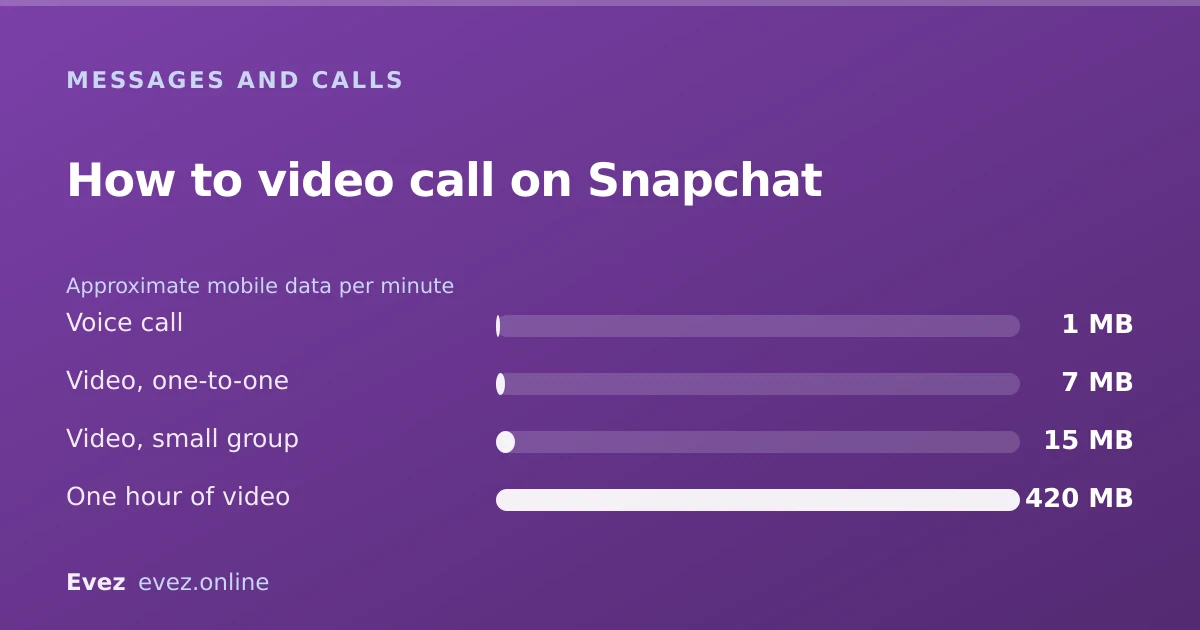
- Video calls use roughly 5–10 MB per minute of mobile data.
On this page
Starting a call
One-to-one
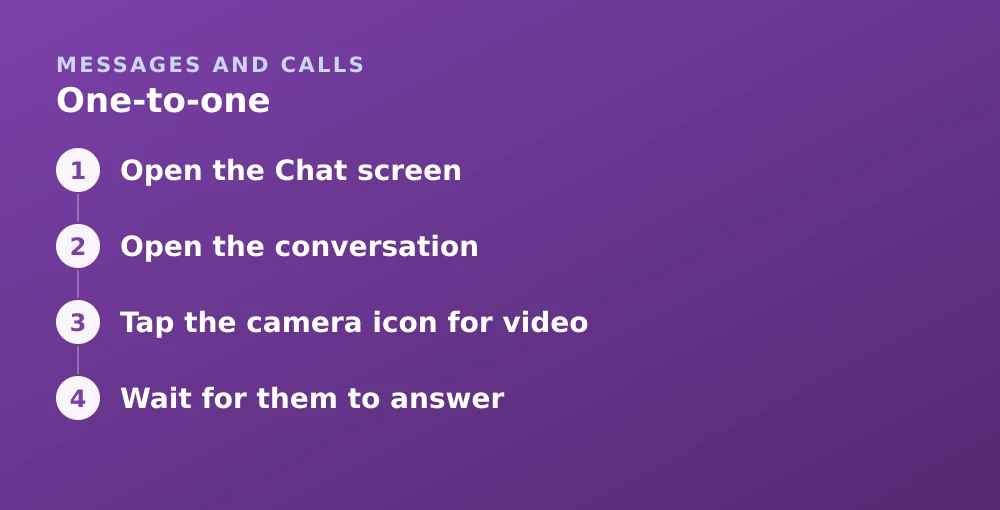
- Open the Chat screenSwipe right from the Camera, or tap the chat bubble icon.
- Open the conversationTap the person's name.
- Tap the camera icon for videoIt sits in the toolbar above the keyboard. The phone icon beside it starts a voice call.
- Wait for them to answerTheir phone rings if notifications are on. If they do not answer you are offered the option to leave a note.
Group calls
Video calling is one of the few Snapchat features that behaves exactly as you would expect, which is worth saying given how little else does. Group calling works from a group chat with the same two icons: everyone is rung, and people can join and leave freely while the call carries on.
- Open the group chat.
- Tap the video or phone icon.
- Everyone in the group is notified and can join.
- Anyone joining late enters the call in progress; nobody has to restart it.
What happens when they do not answer
| What happens | What they see |
|---|---|
| They answer | The call connects |
| They decline | You are told; they see a missed call |
| They do not answer | Missed call in the chat; you can leave a note |
| You cancel before they pick up | Still logged as a missed call |
| They have notifications off | No ring; missed call appears later |
| They have blocked you | The call does not go through at all |
Data usage
Snapchat does not publish per-minute figures, but video calling on a mobile app sits in a well-understood range. These estimates are conservative and useful for planning rather than precise.
Turning on Data Saver reduces background pre-loading but does not meaningfully change call bitrate. If data is tight, voice is dramatically cheaper than video — an order of magnitude, not a small saving.
When calls will not connect
- They are not a mutual friend. Calling generally requires you to have added each other.
- Microphone or camera permission is off. Check your OS settings for Snapchat — this is the most common cause and produces a call that appears to connect but has no audio or video.
- Weak connection. Snapchat adapts the stream down but there is a floor below which it drops.
- They blocked you. The call fails silently from your side.
- Restricted network. Some school and workplace networks block the ports used for calling. Mobile data is the test, if it works there, the network is the cause.
Privacy during a call
Calls are live streams rather than stored messages, and the ordinary Snapchat expectations do not map onto them neatly.
- Calls are not recorded by Snapchat and there is no in-app recording feature.
- The other person can screen-record, and detection is less reliable for a live call than for a snap — see how capture detection varies.
- Screen sharing is available during calls, so be aware of what else is on your screen before you start it.
- Encryption for calls is a separate question from message encryption, covered in what Snapchat encrypts.
To stop specific people being able to call you at all, use Settings → Who Can… → Contact Me, which is the same family of controls described in the privacy settings guide.
Frequently asked questions
Can you video chat on Snapchat?
Yes. Open a conversation and tap the camera icon for a video call, or the phone icon for voice. Group video calls work the same way from a group chat.
How many people can join a Snapchat video call?
Group calls are started from a group chat and support multiple participants, who can join and leave while the call continues. Quality degrades noticeably as the number of video streams grows.
Does Snapchat tell someone if I cancel a call?
Yes. A missed-call entry appears in the conversation even if you hang up before they answer. There is no way to retract a call once it has started ringing.
How much data does a Snapchat video call use?
Roughly 5 to 10 MB per minute for a one-to-one video call, or about 0.5 to 1 MB per minute for voice. An hour of video is in the region of 400 MB.
Sources
Every source below was checked and returned a valid response at the time of the last review. Each note says which claim in this guide it supports.
- How to Start a Video Chat on Snapchat — Snapchat SupportSupports: The steps for starting one-to-one and group video calls from a chat.
- How to Make a Voice Call on Snapchat — Snapchat SupportSupports: Voice call behaviour and what happens when a call is not answered.
- How do I share my screen during Snapchat calls? — Snapchat SupportSupports: That screen sharing is available during calls, referenced in the privacy section.
Related guides

Is Snapchat encrypted?
Snaps are end-to-end encrypted. Text chats have not carried the same guarantee. Here is the precise boundary, and why the difference matters.
Privacy and location · Updated

Can you see who screenshotted your Snapchat story?
For a friends story, yes. For a Public Profile story, the answer changes. A precise table of which content notifies and which does not.
Stories and profile · Updated

Snapchat Ghost Mode and turning your location off
Three different settings all look like turning location off on Snapchat. Only one of them actually stops your phone reporting where you are.
Privacy and location · Updated