Can you see who screenshotted your Snapchat story?
The short answer
For a friends or private story, yes: the viewer list flags anyone who screenshotted. For a public story from a Public Profile, no named list exists. That distinction catches almost everyone out.
Key takeaways
- Private and friends stories: screenshots are flagged in the viewer list.
- Public Profile stories: no named screenshot list.
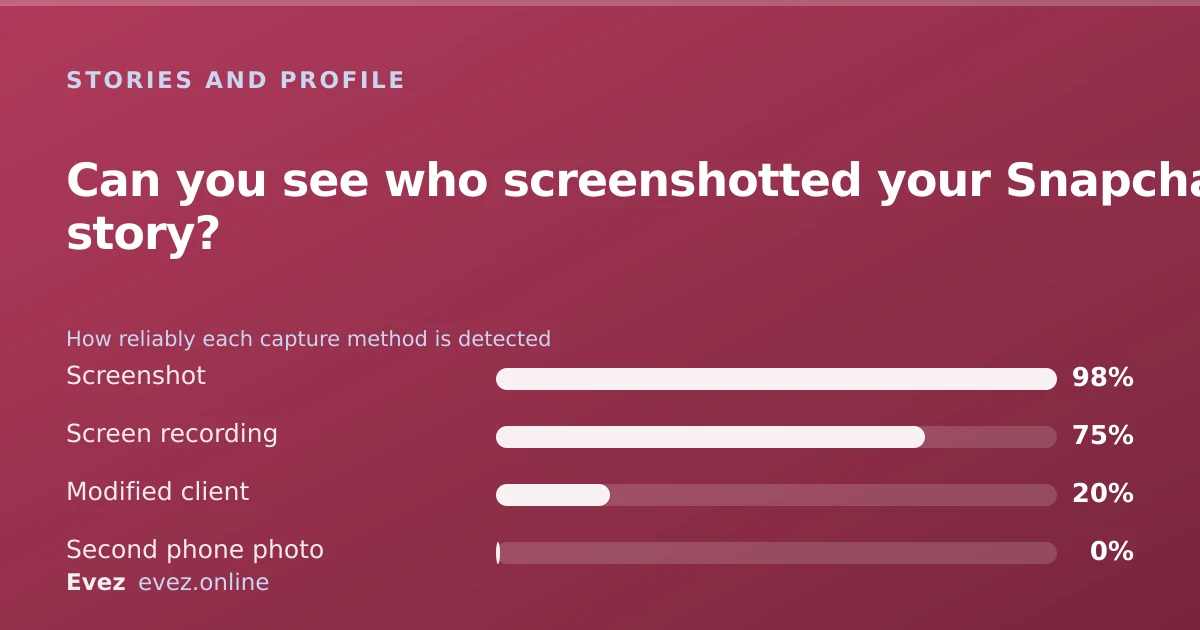
- Screen recording is flagged too on most current devices, but not all.
- Photographing the screen with a second phone is undetectable, always.
On this page
The rule underneath all of it
Whether you find out about a screenshot depends entirely on which kind of story you posted, and hardly anyone realises there is a distinction. Snapchat's screenshot notification exists to enforce a social contract between people who know each other. Once content goes to an audience that includes strangers, that contract stops making sense, and Snapchat stops promising it.
That single principle predicts every row in the table below. The more public the surface, the less you are told.
| Content type | Screenshot flagged? | Named? |
|---|---|---|
| Snap sent directly to you | Yes | Yes |
| My Story (friends only) | Yes | Yes |
| Private Story | Yes | Yes |
| Shared Story | Yes | Yes |
| Public Profile story | No named list | No |
| Spotlight post | No | No |
| Chat message | Yes | Yes |
Where the indicator appears
Checking for screenshots
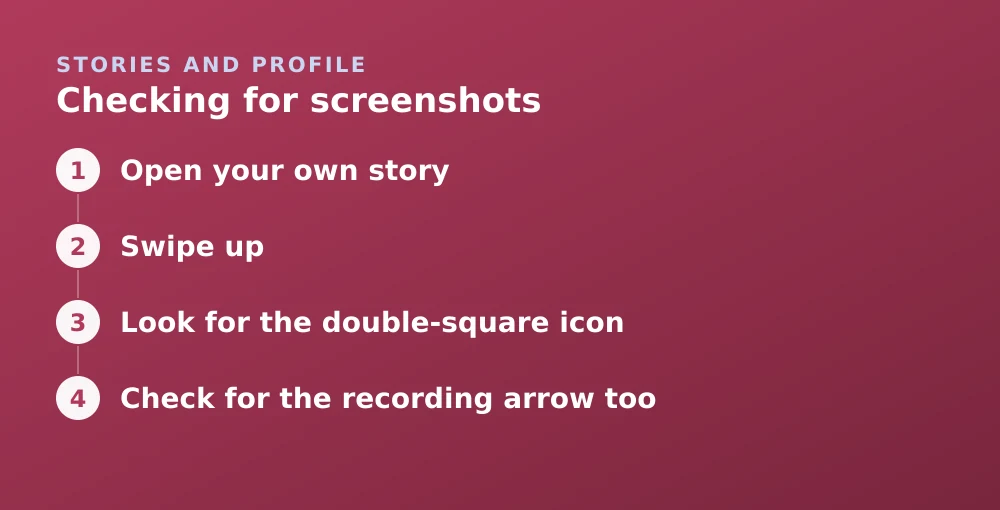
- Open your own storyWhile it is still live — the list expires with the story.
- Swipe upOr tap the eye icon in the bottom-left with the view count.
- Look for the double-square iconTwo overlapping squares beside a name means that person screenshotted.
- Check for the recording arrow tooA separate icon indicates a screen recording where the device reported one.
The same list carries the replay indicator, covered in seeing who replayed your story.
Screen recording is less reliable than screenshots
Screenshot detection is a well-defined operating-system event and Snapchat catches it consistently. Screen recording is messier: the mechanism differs between iOS and Android, changes between OS versions, and is more easily worked around.
Does the other person know you screenshotted?
Asked in reverse, the answer is the mirror image. Screenshot a friend's story and they see it. Screenshot a Public Profile story and they generally do not get a named alert.
- Airplane mode does not help. The event is recorded locally and reported when connectivity returns. This is the most durable piece of bad advice on the subject.
- Deleting the screenshot does not help. The notification fired at the moment of capture.
- Uninstalling the app does not help. Same reason.
- A second device always works and is the reason none of the above matters much.
If you do not want to be screenshotted
The realistic options are about audience rather than detection. You cannot stop the capture; you can control who is in a position to make it.
- Post to a Private Story with a short list rather than to everyone — see creating a private story.
- Tighten who can view My Story in Settings → Who Can… → View My Story.
- Use View Once for direct sends, which limits the window even if it does not prevent capture.
- Do not post it. The only method with a hundred per cent success rate, and worth stating plainly.
For the wider question of what Snapchat protects and what it does not, see what is actually encrypted.
Frequently asked questions
Can you see who screenshotted your public Snapchat story?
No. Stories posted publicly from a Public Profile do not produce a named screenshot list, because the audience includes people who are not your friends. Friends-only and private stories do flag screenshots.
Does Snapchat notify screenshots of a private story?
Yes. Private Stories, Shared Stories and friends-only My Story all mark anyone who screenshots with a double-square icon in the viewer list.
Can I screenshot without them knowing using airplane mode?
No. The screenshot event is recorded on your device and reported once connectivity returns. Airplane mode delays the notification rather than preventing it.
Does Snapchat detect screen recording?
Usually, but less reliably than screenshots. Detection depends on the operating system version and the recording method, so it should not be relied on the way screenshot detection can be.
Sources
Every source below was checked and returned a valid response at the time of the last review. Each note says which claim in this guide it supports.
- How can I see who viewed My Story on Snapchat? — Snapchat SupportSupports: That the viewer list marks screenshots for friends and private stories.
- How do I see who viewed and replied to my public Story? — Snapchat SupportSupports: That public stories provide aggregate information rather than a named screenshot list.
- How do screenshots work on Snapchat for Web? — Snapchat SupportSupports: That screenshot detection behaviour differs by surface and platform.
Related guides
How to see who replayed your Snapchat story
The viewer list shows who watched and how many times. Here is how to read it, what the replay indicator does not tell you, and the ordering myth.
Stories and profile · Updated

How to make a private story on Snapchat
Create a Private Story, add and remove viewers without telling them, and understand how it differs from Custom and Shared stories.
Stories and profile · Updated
Is Snapchat encrypted?
Snaps are end-to-end encrypted. Text chats have not carried the same guarantee. Here is the precise boundary, and why the difference matters.
Privacy and location · Updated