How to leave a private story on Snapchat
The short answer
Open the private story, press and hold it or tap the three dots, then choose Leave Story. You are out immediately and the owner gets no notification, though the viewer list will show you gone.
Key takeaways
- Press and hold the story on the Stories screen — the option is in that menu, not in settings.
- No notification is sent, but your absence is visible if the owner looks.
- Leaving is permanent from your side: only the owner can add you back.
- You cannot see a list of every private story you are on — you find them by scrolling.
On this page
Leaving one
Four taps
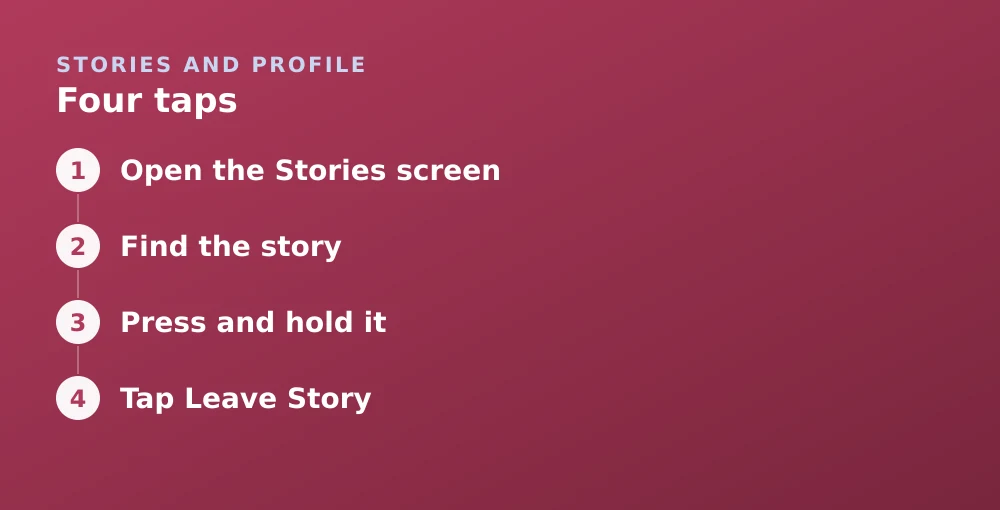
- Open the Stories screenSwipe left twice from the Camera, or tap the Stories icon.
- Find the storyPrivate Stories you are on appear among your friends' stories, labelled with the name the owner gave it.
- Press and hold itOr tap the three dots beside it, depending on your app version.
- Tap Leave StoryConfirm. You are removed at once and the story disappears from your feed.
Finding which ones you are on
Being added to a Private Story you never asked to join is a small and very specific kind of awkward, made worse by there being no screen that lists the ones you are in. That is a genuine gap. Private Stories only surface when the owner posts to them, so a story you were added to a year ago and never see is effectively invisible until it appears.
- Open the Stories screen and scroll the full list of friends' stories.
- Private Stories carry a name rather than just a person's username — that is how you spot them.
- A padlock or similar marker appears alongside them in most versions.
- Anything you do not recognise is worth pressing and holding to check.
What happens after you leave
| Thing | While on the list | After leaving |
|---|---|---|
| Seeing new posts | Yes | No |
| Seeing past posts | Yes | No — access is retroactive |
| Owner notified | — | No |
| Owner can tell if they look | — | Yes |
| Rejoining yourself | — | Not possible |
| Your friendship with them | Unaffected | Unaffected |
Leaving versus the alternatives
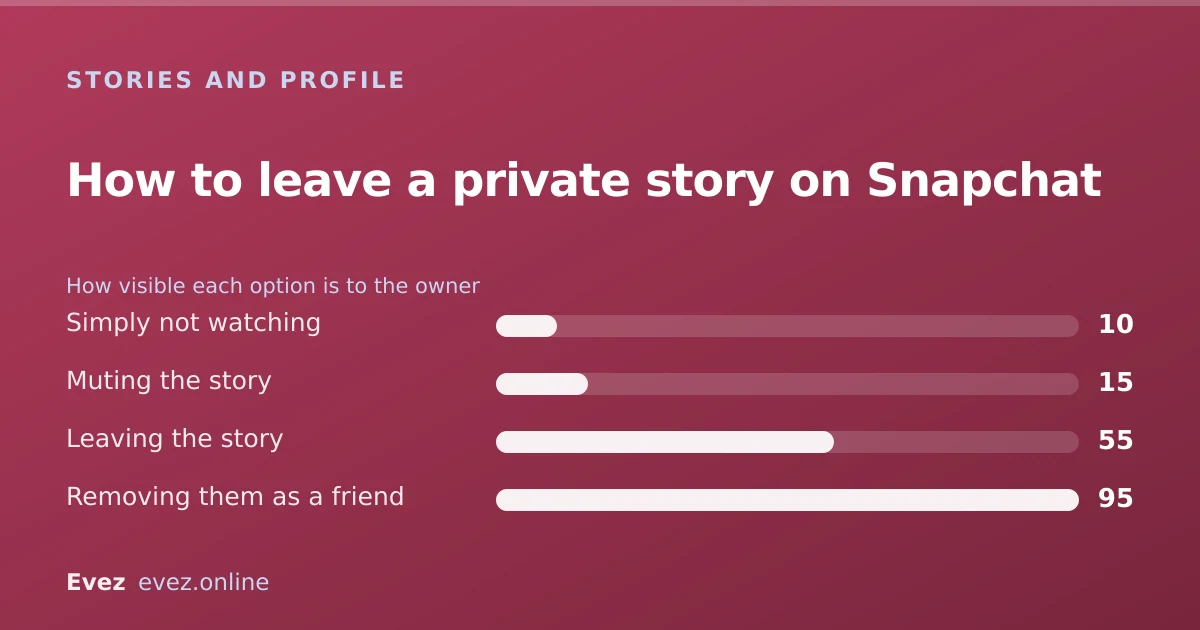
Leaving is the strongest option and not always the right one. Two lighter alternatives exist, and they solve the more common versions of the problem.
- Mute it. Press and hold, then Mute Story. It stops appearing prominently and you stop being nudged to watch, but you remain on the list. Least visible option.
- Just do not watch. You show as unviewed, which is the same thing the owner sees from anyone who has not opened it yet.
- Leave. Cleanest if you genuinely do not want the content, and quiet enough for most situations.
If leaving is not enough
Leaving a story removes you from one audience. It does not stop the person contacting you, seeing your stories, or finding you on the Map. If the underlying issue is the person rather than the content:
- Restrict who sees your own stories — Settings → Who Can… → View My Story, or move to a private story of your own.
- Hide your location from them specifically, using the exclude list in the location settings.
- Block them, which removes all of it at once and is visible to them.
- Report the behaviour if it goes beyond unwanted — the routes are in the support guide.
For what the owner can see about who watched and when, see reading the story viewer list.
Frequently asked questions
How do I leave someone's private story on Snapchat?
Find the story on the Stories screen, press and hold it or tap the three dots, then choose Leave Story. You are removed immediately and it disappears from your feed.
Does the owner know if I leave their private story?
No notification is sent. However, you disappear from their viewer list and from the story's settings, so an owner who checks will be able to tell.
Can I rejoin a private story after leaving?
Not on your own. Only the story's owner can add you back, so rejoining requires asking them directly.
How do I see all the private stories I have been added to?
There is no list. Private Stories only appear in your Stories feed when the owner posts to them, so you find them by scrolling and looking for named stories rather than plain usernames.
Sources
Every source below was checked and returned a valid response at the time of the last review. Each note says which claim in this guide it supports.
- How to Create a Private or Shared Story on Snapchat — Snapchat SupportSupports: How Private Story membership works and that only the owner controls the viewer list.
- How do I manage Stories from my account profile screen? — Snapchat SupportSupports: The press-and-hold story management menu that contains the leave and mute options.
- How can I see who viewed My Story on Snapchat? — Snapchat SupportSupports: That the owner sees a viewer list, which is how a departure becomes noticeable.
Related guides

How to make a private story on Snapchat
Create a Private Story, add and remove viewers without telling them, and understand how it differs from Custom and Shared stories.
Stories and profile · Updated
How to see who replayed your Snapchat story
The viewer list shows who watched and how many times. Here is how to read it, what the replay indicator does not tell you, and the ordering myth.
Stories and profile · Updated
Snapchat Ghost Mode and turning your location off
Three different settings all look like turning location off on Snapchat. Only one of them actually stops your phone reporting where you are.
Privacy and location · Updated