How to view a snap without opening it
The short answer
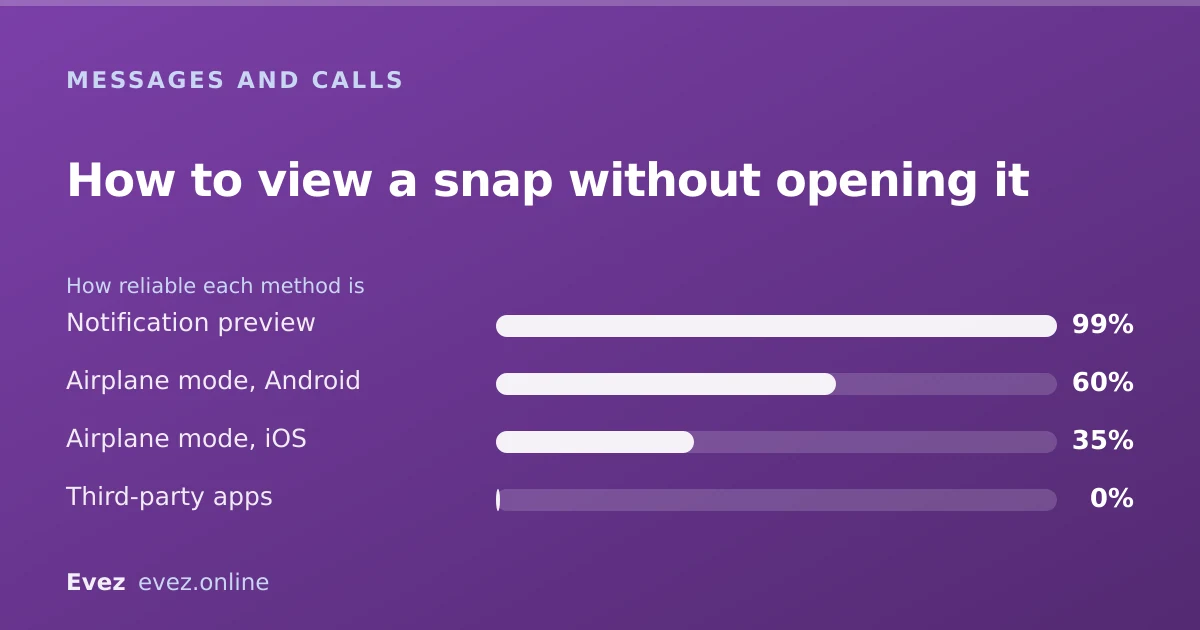
Not reliably. Notification previews show a thumbnail without marking it opened, and airplane mode works occasionally, but both fail often and leave clues. There is no clean way to do this.
Key takeaways
- Notification previews are the safer method and show much less.
- Airplane mode works only if the snap was already downloaded before you disconnected.
- Forgetting to force-quit before reconnecting marks the snap as opened.
- The sender can often infer what happened from the timing even when it works.
On this page
Why people want this, and what it costs
The read receipt on a snap is unusually binding. Opening it tells the sender the exact moment you did, which turns a casual message into a small social obligation. That is the entire reason this question exists, and it is worth being clear that neither workaround is clean.
Method 1 — notification previews
The lowest-risk method, because it never touches the app. If notification previews are enabled, the lock screen or banner shows a thumbnail of an incoming snap. Looking at it does not open the snap.
Setting it up
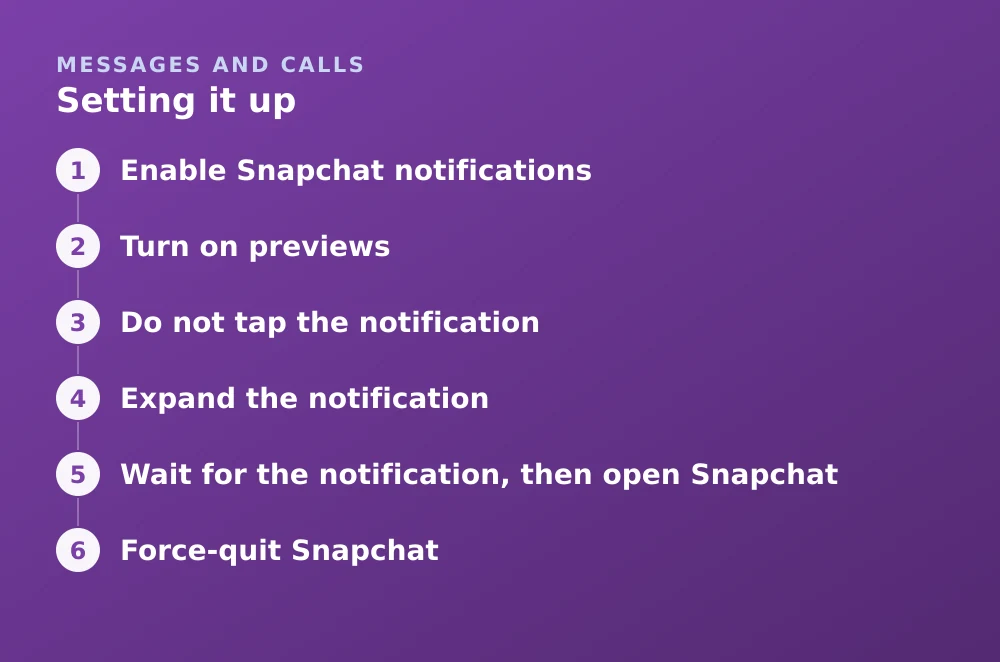
- Enable Snapchat notificationsiOS: Settings → Notifications → Snapchat. Android: Settings → Apps → Snapchat → Notifications.
- Turn on previewsiOS: Show Previews → Always. Android: allow notification content on the lock screen.
- Do not tap the notificationTapping opens the app and the snap. Look only.
- Expand the notificationPull down or long-press to enlarge it. On iOS this often shows a larger preview without opening anything.
- What you get: a thumbnail, sender name, and sometimes the first line of a chat message.
- What you do not get: video, anything beyond the first snap in a series, and any real detail.
- Risk: effectively zero. You never interact with the app.
- Downside: it shows so little that it often does not answer the question you had.
Method 2 — airplane mode
The one people mean when they ask. It relies on Snapchat pre-downloading snaps so they open instantly: if the content is already on your phone, you can view it with no connection, and the "opened" event cannot be reported.
The full sequence — every step matters
- Wait for the notification, then open SnapchatLet the chat list load fully so the snap downloads. Do not open the snap.
- Force-quit SnapchatSwipe it away from the app switcher. This must happen before the next step.
- Turn on airplane modeConfirm Wi-Fi is off too — airplane mode does not always disable it.
- Reopen Snapchat and view the snapIt plays from the local copy. There is no connection to report the open.
- Force-quit againCritical. Leaving the app running means it reports the open the instant you reconnect.
- Clear the app's cache or dataOn Android, clear the app cache. On iOS this step is unavailable, which is why the method is less reliable there.
- Turn airplane mode offIf everything worked, the snap still shows as unopened to the sender.
What the sender can still work out
Even a technically successful attempt leaks information, because the sender sees more than a single flag.
| Signal | Visible to sender |
|---|---|
| Snap marked opened | No, if the method worked |
| Your last-active time in chat | Yes — you were clearly online |
| Your Bitmoji updating on the Map | Yes, unless in Ghost Mode |
| Your Snapscore changing | Yes, if you sent anything |
| Typing indicator | Yes, if you started a reply |
If concealing activity is genuinely the goal, Ghost Mode removes the Map signal, which is the loudest of the remaining ones.
What does not work
- Third-party apps promising silent viewing. They require a modified client, which Snapchat detects — see why that gets accounts locked.
- Half-swiping to peek. This works for chat messages, not for snaps, and half-swipe detection has changed repeatedly between versions.
- Turning off read receipts. Snapchat has no such setting for snaps. This is not something you can disable.
- Opening on Snapchat for Web instead. The open is reported the same way.
The alternative worth considering
Change the retention setting on the conversation instead. Chat Settings → Delete After Viewing versus 24 Hours After Viewing changes how long messages persist, which addresses the underlying pressure more durably than a workaround that fails a third of the time.
And if the issue is that a specific person's messages carry an expectation you would rather not have, muting the conversation is a more honest solution than a technical one. For what is preserved either way, see what Snapchat retains.
Frequently asked questions
Can you open a snap without the sender knowing?
Sometimes, using airplane mode with a pre-downloaded snap, but it fails often — particularly on iOS. Notification previews are far more reliable but show only a small thumbnail.
Does airplane mode stop Snapchat read receipts?
Only if you force-quit the app both before and after viewing, and clear the cache where possible. Otherwise the pending open event is transmitted as soon as you reconnect.
Can you turn off read receipts on Snapchat?
No. Snapchat has no setting to disable read receipts for snaps. Opening one always reports the open, which is why the workarounds exist.
Do apps that let you view snaps secretly work?
No. They rely on a modified Snapchat client, which Snapchat detects and responds to by locking the account. Many also harvest login credentials.
Sources
Every source below was checked and returned a valid response at the time of the last review. Each note says which claim in this guide it supports.
- How to Replay a Snap — Snapchat SupportSupports: How snap open and replay events are recorded and reported to the sender.
- How do I use Snapchat in Data Saver mode — Snapchat SupportSupports: That Snapchat pre-downloads media, which is the mechanism the airplane-mode method relies on.
- My Snapchat account is locked — Snapchat SupportSupports: That third-party and modified Snapchat clients result in account locks.
Related guides

How to recover deleted Snapchat messages
What Snapchat actually retains, how to request your own data archive, why recovery apps cannot work, and the one case where messages survive.
Messages and calls · Updated

Snapchat Ghost Mode and turning your location off
Three different settings all look like turning location off on Snapchat. Only one of them actually stops your phone reporting where you are.
Privacy and location · Updated

How to log out of Snapchat
Signing out on iPhone, Android and the web, removing a device you no longer have, and why Snapchat logs you out without warning.
Account management · Updated